
26th Mar 2026
Walkie Talkie Battery Life: How to Maximize Your Two-Way Radio's Power
Tested and Reviewed by The Baofeng UK Radio Experts | Technical Support Guide | Read time: 5 mins
Imagine this: You are eight hours into a grueling 12-hour security shift at a busy festival, or perhaps you are miles away from civilization, hiking through the Scottish Highlands. You reach for your radio to relay a critical message, press the Push-to-Talk (PTT) button, and hear the dreaded low-battery beep before the unit powers down completely.
In professional and outdoor environments, a dead radio is more than just an inconvenience; it is a breakdown in your safety and operational lifeline. Understanding and optimizing your walkie talkie battery life is one of the most important skills any radio user can master. Whether you are using a standard PMR446 radio for a weekend camping trip or deploying high-powered Baofeng transceivers for a commercial security team, these expert tips will ensure your comms stay up and running when you need them most.
The Real-World Cost of a Dead Walkie Talkie Battery
Many users assume that a radio battery behaves exactly like a smartphone battery. In reality, two-way radios process power very differently. A smartphone trickles power constantly to maintain background apps and a screen. A walkie-talkie, however, uses very little power on standby but draws a massive spike of energy the moment you press the PTT button to transmit your voice.
Understanding the "5-5-90" Duty Cycle
To truly maximize your battery, you must understand how manufacturers calculate battery life. In the radio industry, we use the "5-5-90 rule." This assumes your radio's usage is split into:
- 5% Transmitting (TX): Talking into the radio (Highest power drain).
- 5% Receiving (RX): Listening to someone else talk (Moderate power drain).
- 90% Standby: Waiting for a transmission (Lowest power drain).
If you are constantly chatting on the radio, you are pushing your transmit time well above 5%, which will drain a standard battery in a matter of hours. The first step to extending battery life is practicing concise, efficient radio etiquette. Think before you speak, keep messages brief, and release the PTT button immediately.
Expert Guide: 5 Ways to Maximize Walkie Talkie Battery Life
Beyond simply talking less, there are several operational and technical strategies you can use to drastically extend your radio's uptime.
1. Master the First Charge (Conditioning)
How you treat a brand-new lithium-ion (Li-ion) battery dictates its long-term health. When you first unbox your new radio, do not simply turn it on and use it until it dies. For optimal long-term capacity, place the battery in the charging dock and let it charge fully until the indicator light turns green (usually 12 to 14 hours for the very first charge). For more in-depth information on battery chemistry, check out our comprehensive guide to walkie-talkie batteries.
2. Switch to Low Power (TX) Mode
This is the most effective trick in the book. Most modern transceivers, especially long-range two-way radios, offer adjustable transmission power settings. For example, a radio might have a "High" setting of 5W and a "Low" setting of 1W. Transmitting at 5 watts drains the battery incredibly fast. If you are only communicating with a colleague on the other side of a retail store, or a car just a few hundred metres away in a convoy, you do not need 5 watts of power. Switch your radio to the "Low" power setting. You will maintain crystal-clear audio at short ranges while doubling your battery's lifespan for that shift.

3. Protect Your Radio from Extreme Cold
If you use your radios for skiing, winter hiking, or working in refrigerated warehouses, you have likely noticed your battery dying rapidly. This is pure physics. Cold temperatures increase the internal resistance of Lithium-ion batteries, reducing their capacity to release energy.
If you are operating in freezing conditions, keep the radio inside your jacket close to your body heat, and use a shoulder speaker microphone routed to your collar. Keeping the battery pack warm can save you hours of operational time.
4. Don't Use Your Charger as a Stand
A very common mistake made by office and retail staff is leaving the radio sitting in the active charging cradle all day when they are at their desk. Constantly keeping a Li-ion battery at 100% and continuously "trickle charging" it degrades the cell's lifespan over months. Only place the radio in the charger when the battery actually needs charging, and remove it once the light turns green.
5. Utilize Built-In Battery Saver Modes
Almost all modern Baofeng radios feature an internal "Battery Save" setting (often found in the menu settings). When activated, this mode puts the radio's receiver into a micro-sleep state during prolonged periods of silence, waking up instantly the millisecond it detects an incoming signal. Ensuring this feature is turned on is a free, effortless way to gain extra standby hours.
Hardware Upgrades: Extending Your Power
Sometimes, software tweaks and good habits aren't enough for extreme situations. If you are consistently running out of power, it is time to look at your hardware.
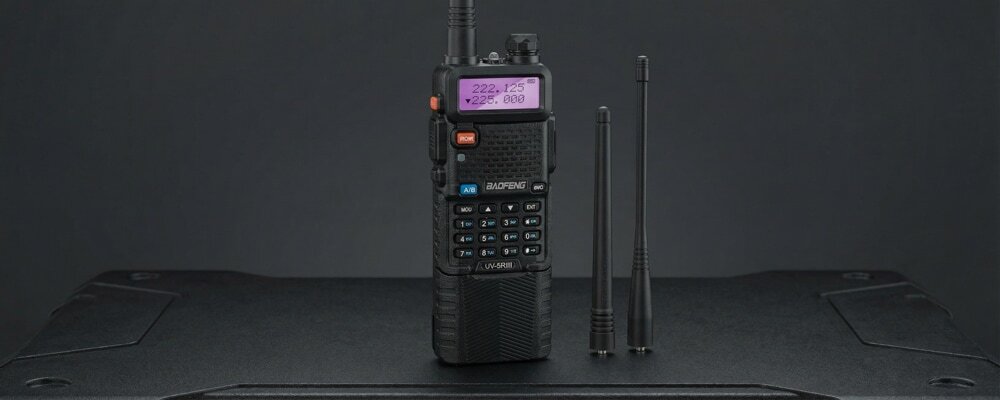
Standard walkie-talkies usually come with an 1800mAh battery, which is perfectly adequate for standard 8-hour shifts. However, for serious users, upgrading is essential. For instance, the legendary Baofeng UV-5R III can be equipped with an extended 3800mAh battery pack. This physically larger battery dramatically increases the radio's footprint but allows for multi-day use without ever seeing a wall socket.
Furthermore, if you are using your radio in a vehicle, invest in a "Battery Eliminator." This clever accessory replaces your battery pack and plugs directly into your car's 12V cigarette lighter, powering the radio indefinitely and saving your actual battery for when you step out of the vehicle.
By implementing the 5-5-90 rule, adjusting your transmission power, and taking care of your lithium-ion cells, you can banish the low-battery beep for good and ensure your communications are always loud and clear.
Frequently Asked Questions (FAQs)
1. How long does a walkie-talkie battery usually last?
On average, a standard two-way radio battery will last between 8 to 12 hours based on the standard 5-5-90 duty cycle (5% transmitting, 5% receiving, 90% standby). Upgraded high-capacity batteries (like 3800mAh models) can last well over 24 hours of standard use.
2. Should I completely drain my walkie-talkie battery before recharging?
No. Modern walkie-talkies use Lithium-ion (Li-ion) batteries, which do not suffer from the "memory effect" that older Nickel-Cadmium (NiCd) batteries did. It is actually healthier for a Li-ion battery to be recharged when it drops to around 20%, rather than draining it completely flat.
3. Why does my radio battery die so fast in the winter?
Lithium-ion batteries rely on chemical reactions that slow down drastically in freezing temperatures. The cold increases internal resistance, preventing the battery from delivering its full power. Keep the radio under your coat to keep it warm in winter environments.
4. Does lowering the volume save walkie-talkie battery life?
Yes, but only slightly. The speaker draws power during the "Receive" phase. Keeping the volume at a reasonable level instead of maximum will save a small amount of battery, but reducing your "Transmit" power (from High to Low) will have a vastly larger impact.
5. Can I overcharge my two-way radio battery?
While modern charging docks have built-in safety cut-offs, leaving a radio in the cradle 24/7 is not recommended. It keeps the battery in a state of high stress and heat, which will degrade the battery's overall lifespan and maximum capacity over time. Remove it once fully charged.